In this blog, I will be showing how to build a bare minimum URL shortener API using Python Flask+MySQL.
What is Flask?
Flask is a web framework, it’s a Python module that lets you develop web applications easily. It has a lot of useful in-built functionalities like routing, a template engine, request handling and more.
Let's start building
All the code that I am going to be using will be available on the GitHub. If you don't already have it, download MySQL.
Designing Database
Firstly, set up a MySQL server, If you don't know how then I recommend following this tutorial by Web Dev Simplified.
We will need to create a database to work with, So start your MySQL server and create a database using
CREATE DATABASE urlshortener;
USE urlshortener;
To design a Database for a URL Shortener API you need to store three things:
- Orginal Link (String)
- Short URL (String, Unique)
- Visitor Count (Integer)
So we will go ahead and create a table for the above-mentioned fields and an extra field id which will be the Primary Key for our table and will have Auto Increment. (This field will be useful in future if we decide to expand the features).
CREATE TABLE urls(
    id INT AUTO_INCREMENT PRIMARY KEY,
    link VARCHAR(100),
    short_url VARCHAR(100) UNIQUE,
    visitors INT DEFAULT 0
);
Now, We know how our Database is going to look like so we can go ahead and program our API endpoints in Flask
Creating Application
We will be using the minimal example from the Flask website as a starting point but adding one extra segment in the end which will basically start the flask app when we run the python file.
from flask import Flask

app = Flask(__name__)

@app.route('/')
def hello_world():
    return 'Hello, World!'

# Start flask app automatically when run with python
if __name__ == '__main__':
    app.run(host='0.0.0.0')
As you know the shortened URL for every website needs to be unique so we need to generate unique IDs for every URL, to generate unique URLs I will be using shortuuid and for connecting to the database I will be using pymysql. So let's install them
pip install pymysql shortuuid
Now we will go ahead and import these along with few methods from Flask that we will be using like request and jsonify. So our final imports look like:
from flask import Flask, request, jsonify
import pymysql
import shortuuid
For this project, I only want to create a very basic API which will have 4 endpoints:
- To add a new URL in Database
- Fetch Data for Shortened URL
- Increase visitor counter in Database
- Get all the shortened URLs data
We will need to connect to the database, Let's create a connection using pymysql with the following function:
def get_connection():
    connection = pymysql.connect(host="localhost", user="<user>", password="<password>",
                                 db="urlshortener", charset='utf8mb4', cursorclass=pymysql.cursors.DictCursor)
    return connection
This function will return a connection object when called. Let us start designing endpoints
1. Add New URL to Database
On this endpoint, we will accept a parameter called link through POST method. Then, we will then generate a short URL using shortuuid. Finally, we will create a new row in the table urls with the provided link and short URL that we have generated.
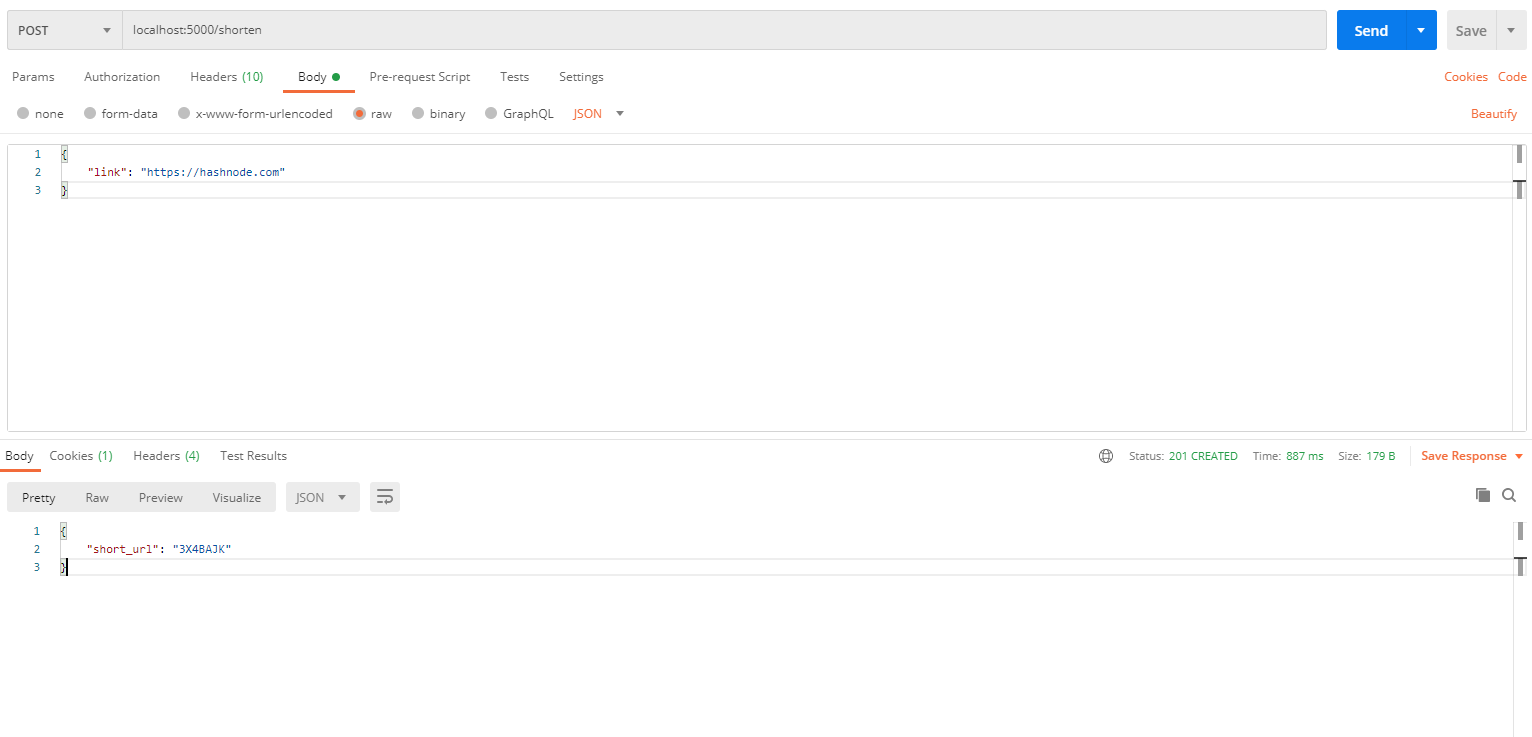
Our endpoint will return the shortened version of the original URL in the form of JSON with status code 201. Our endpoint will look like:
@app.route('/shorten', methods=["POST"])
def shorten():
    # Check if "link" parameter exists
    if request.json and request.json['link']:
        link = request.json['link']

        # Get MySQL connection
        con = get_connection()
        cur = con.cursor()

        # Generate unique url for length 7
        short_url = shortuuid.ShortUUID().random(length=7)

        # Insert "link" and "short_url" in the table "urls"
        query = "INSERT INTO urls (link, short_url) VALUES (%s, %s)"
        cur.execute(query, (link, short_url))
        con.commit()
        cur.close()
        con.close()

        # Return shortened URL
        return jsonify({"short_url": short_url}), 201

    # Return error if "links" is not provided in json request
    return jsonify({"error": "Please proive an URL to shorten."}), 400
2. Fetch Data for Shortened URL
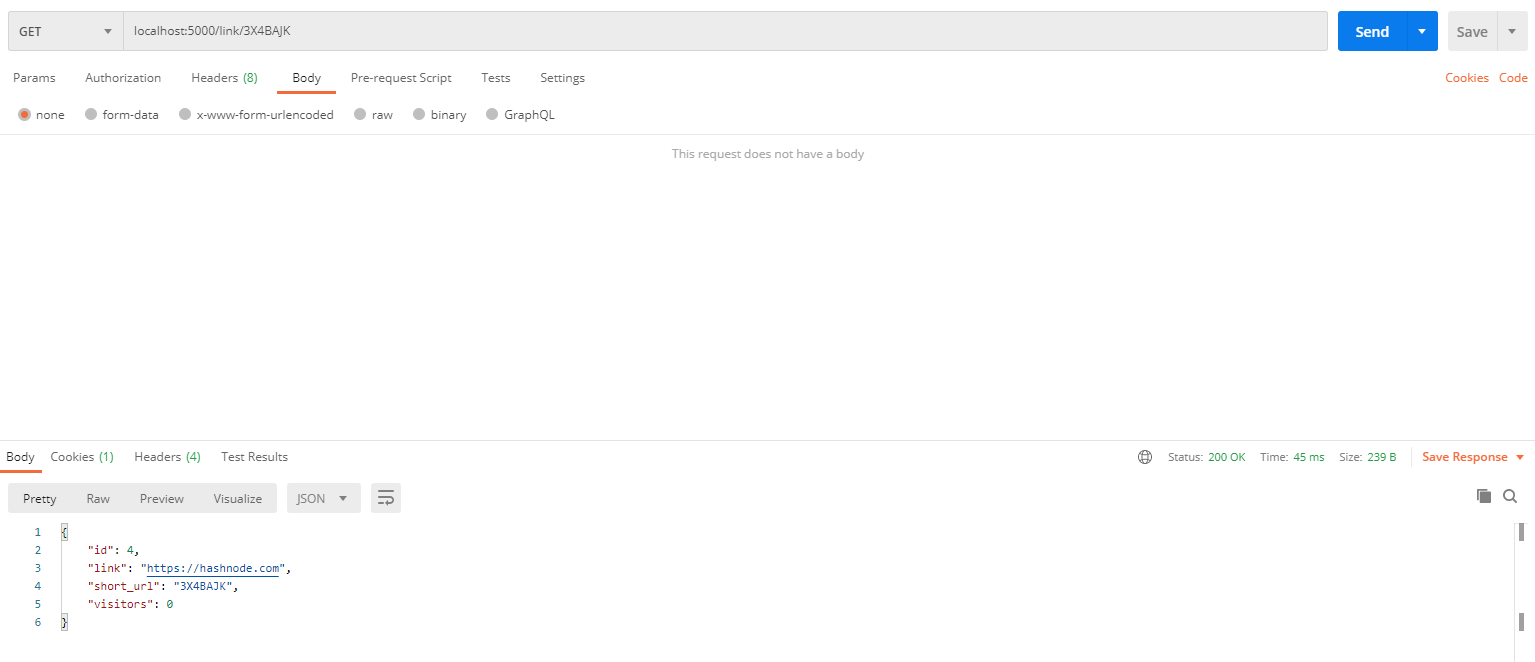
For this endpoint, we will in-take a short URL through route and return its data from the table urls.
If there is no data then we will return an error.
@app.route('/link/<short_url>')
def getlink(short_url):

    # Get the connection
    con = get_connection()
    cur = con.cursor()

    # Fetch row of the provided "short_url" from table "urls"
    query = "SELECT * FROM urls WHERE short_url = %s"
    cur.execute(query, (short_url))
    data = cur.fetchone()

    # Check if the query returned any data
    if data:

        # If yes then  returnt the data
        return jsonify(data), 200
    cur.close()
    con.close()

    # If no data has been found, return a 404
    return jsonify({"error": "No data found"}), 404
3. Increase visitor counter in Database
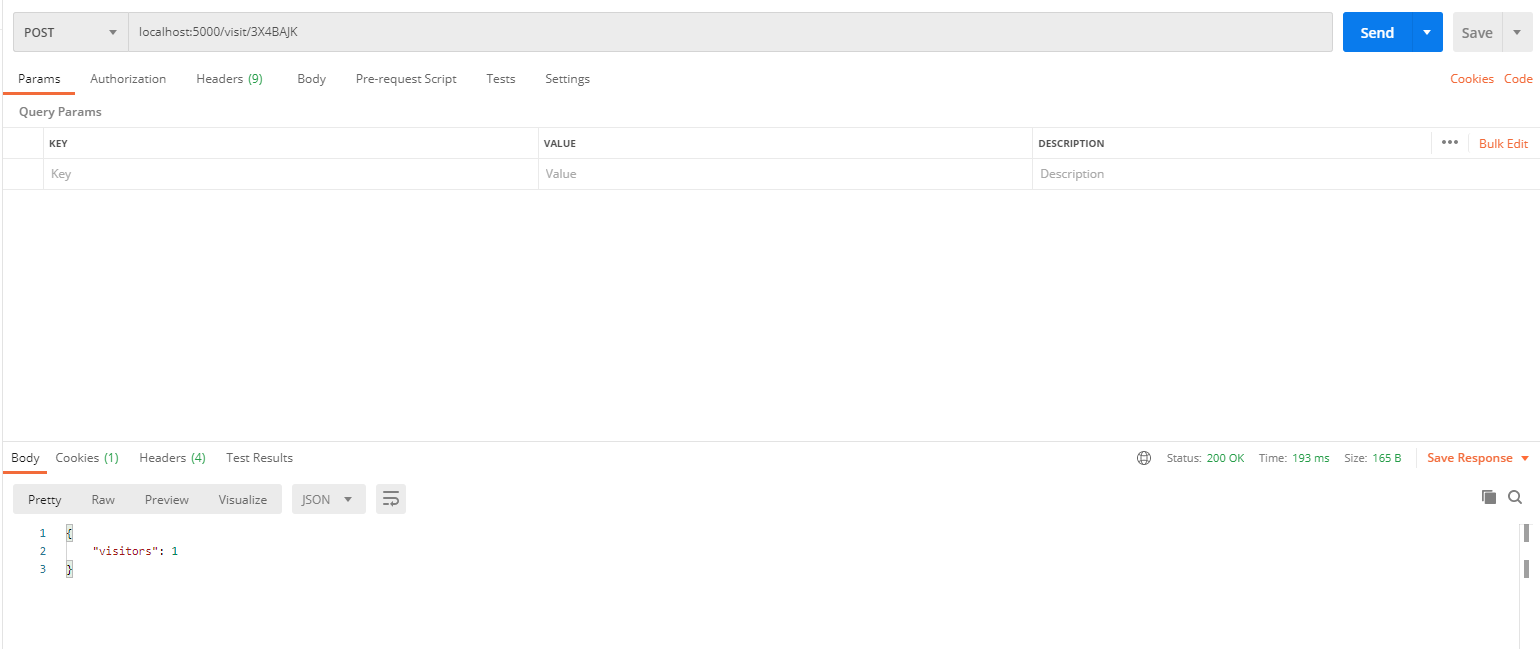
Here, we will increment the existing "visitor" field in table urls with +1 and return the latest count.
@app.route('/visit/<short_url>', methods=["POST"])
def visit(short_url):

    # Get the connection
    con = get_connection()
    cur = con.cursor()

    # Update visitor count to current_count+1 if the short_url exists
    try:
        query = "UPDATE urls SET visitors=visitors+1 WHERE short_url = %s"
        cur.execute(query, (short_url))
        con.commit()

    # If short_url doesnt exists then return an error
    except:
        return jsonify({"error": "Please check the short_url."}), 400

    # Fetch latest visitor count
    query = "SELECT visitors FROM urls WHERE short_url = %s"
    cur.execute(query, (short_url))
    visitors = cur.fetchone()['visitors']
    cur.close()
    con.close()

    # Return the latest visitor count
    return jsonify({"visitors": visitors}), 200
4. Get all the shortened URLs data
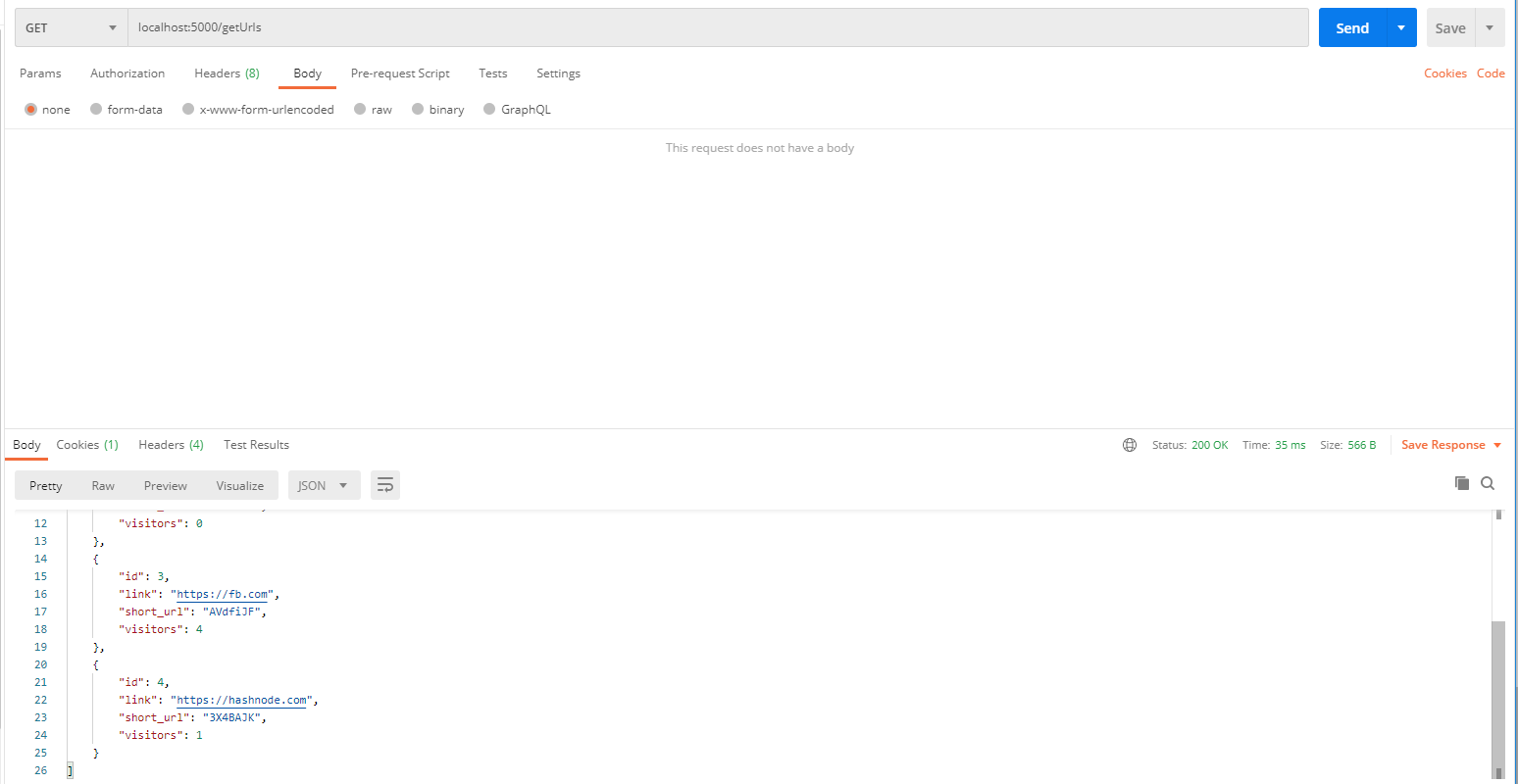
For this endpoint, we are just going to dump all the data within urls table.
@app.route('/getUrls')
def getUrls():

    # Get the connection
    con = get_connection()
    cur = con.cursor()

    # Get all the data from table "urls"
    query = "SELECT * FROM urls"
    cur.execute(query)
    data = cur.fetchall()

    # if there is any data return the data
    if data:
        return jsonify(data), 200
    cur.close()
    con.close()

    # Return error if the table is empty
    return jsonify({"error": "No data found"}), 404
That's It! We are done with all 4 of our Endpoints. I have also added some sample data directly to the Database manually so we could test all of the endpoints easily.
Testing the Application
To test the application I will be using Postman.
Test 1: Shortening URL
{
    "link": "https://hashnode.com"
}
Test 2:
GET: localhost:5000/link/3X4BAJK
Test 3:
POST: localhost:5000/visit/3X4BAJK
Test 4:
POST: localhost:5000/getUrls
That's it! a bare minimum URL Shortener API
Find all of the code below
For the next blog, I am going to Dockerize it using docker-compose. If you are interested in learning about how to deploy multiple containers using docker-compose make sure to check it out.
Subscribe to my newsletter if you are interested in learning more about DevOps, Frontend Development, Backend Development, Machine Learning and as well as Freelancing. Follow me on Twitter @abbasmdj.
Comments
Join the discussionNo comments yet. Be the first to comment.